CLZ Music review: for collectors who mean business
CLZ Music looks ready for an afternoon of cataloguing. Artist folders down the side, records in the middle, details alongside them. There are columns to configure and fields to fill. It puts the administration of a collection front and centre, and makes little effort to disguise it.
That is a sensible priority when you have thousands of records, several storage locations or years of carefully kept notes. If you have a few hundred albums and mostly want to browse the covers, the case is less obvious. CLZ asks you to care about the catalogue as well as the collection.
A database with record covers
The Web interface has an old-school desktop-software feel: dense toolbars, narrow rows and tabbed forms. There is something of the Windows 98 filing cabinet about its approach, even though this is a browser product. It is built to keep information close together, rather than give each album a spacious stage.
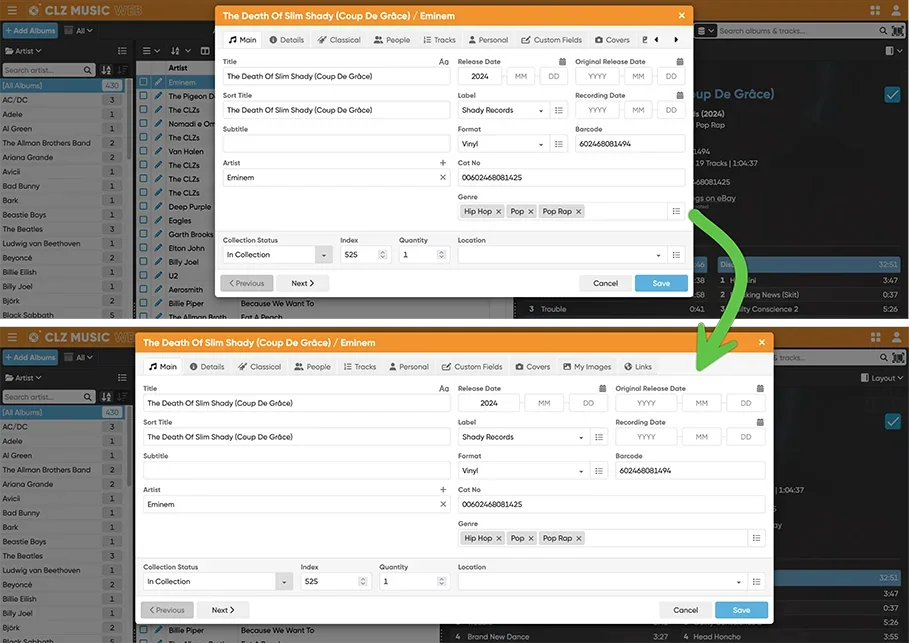
For sustained editing, that density can be an advantage. You can compare entries without constantly opening and closing individual album pages. Once you have arranged the columns around the information you use, the screen becomes a working surface. It is less inviting if you came to relax with your records.
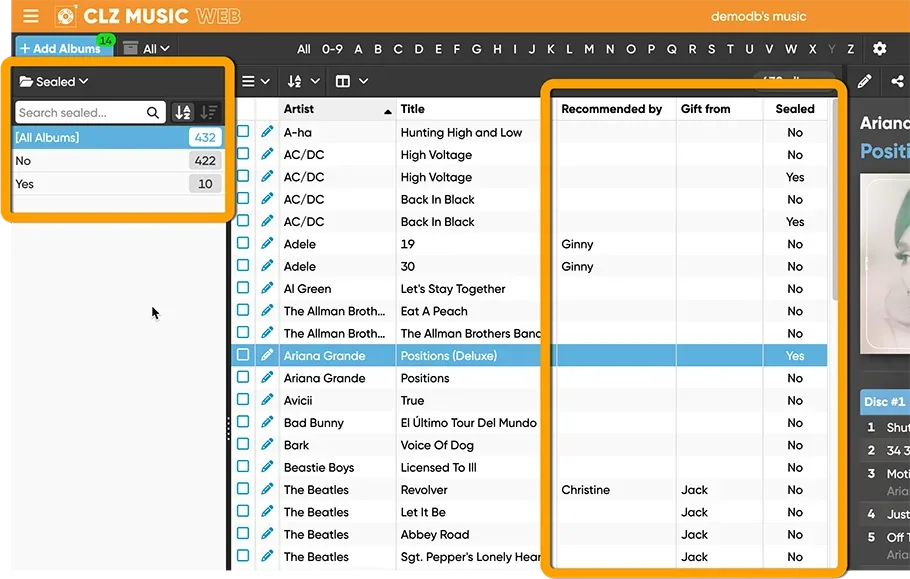
Old-fashioned presentation does not mean abandoned software. CLZ has recently added custom fields, improved keyboard support and widened the editing window. The changes largely serve the same purpose: make catalogue work easier. Familiar controls can be valuable to someone who has spent years building a system around them, without requiring us to pretend every long-term user dislikes change. *1
Where the detail earns its keep
CLZ Music Web lets you record location, ownership and purchase details alongside album information. Barcode or artist-and-title searches supply the starting entry; personal fields turn it into a record of your copy. Mobile is a separate iOS and Android app, with cloud synchronisation connecting the products. *2
Custom fields go further. A yes/no flag can mark a copy for replacement; a selectable list can keep storage locations consistent. You can use fields as columns, sort on them and edit multiple entries together. That is much more useful than repeatedly searching a general notes box for a phrase you may have written differently last time. *3
The cost is upkeep. A field is only useful if you keep filling it in. Adding every possible detail can turn a quick purchase into a small clerical task. CLZ makes room for that level of care, but it does not make the work disappear.
Vinyl-specific fields include matrix numbers and a last-cleaned date. These are worthwhile details for a collector tracking individual copies. They record what you have established about a pressing; they do not establish it for you. A barcode match still needs checking against the record in your hand. Our pressing guide explains where to look. *4
Serious does not have a minimum record count
The strongest case is a collection large enough that memory has stopped being useful: records in different rooms, duplicates across formats, purchases you cannot reliably recall. Customer feedback includes collections running into several thousand items, with praise for finding records and avoiding duplicate purchases. *5
But a thousand records is not a sensible admission requirement. A smaller collection with detailed condition notes or several editions of each title can need more management than a much larger shelf of straightforward entries. Below that scale, the question is whether you need the fields and exports, or simply like the idea of being organised.
CLZ has the temperament of an inventory tool. That can suit archive-like work, but a businesslike screen is not evidence that it is primarily business software. Its public pitch is to collectors. Treat it as a personal catalogue unless the particular commercial workflow you need has been established.
What customers value, and what gets in the way
CLZ Music Mobile holds 4.84/5 from 1,364 US App Store ratings in our September 10 snapshot. That score belongs to the mobile app, not the Web product. *11
Music users repeatedly praise detailed records, quick entry and helpful support. Long-term users describe keeping their libraries organised over years; others value having the catalogue on a phone when shopping. That supports confidence in CLZ as an established tool people keep using, without turning customer satisfaction into a claim that it never fails. *6
Cost is a more pointed complaint. Even a favourable four-star account from a collector with 1,100 discs questions whether another renewal is worthwhile. A useful database can still feel expensive when the payment keeps returning. *7
There is also friction for people with a history in the older Windows Music Collector product. Its user-defined fields do not continuously sync with the newer Web and Mobile custom fields. CLZ offers a one-time transfer into Web, after which Web and Mobile can work together. For someone with years of personal data, that is a migration decision, not a small settings change. *8
This is the sort of limitation that matters more than whether a toolbar looks fashionable. The longer you have maintained a catalogue, the more important it becomes to preserve the information and workflow you already trust.
Getting information back out
Web can now export track lists to CSV and print them to PDF, alongside album lists. Track mode adds individual rows with track title, artist, length and index information. That is useful if your catalogue work extends to printed lists or spreadsheets. *9
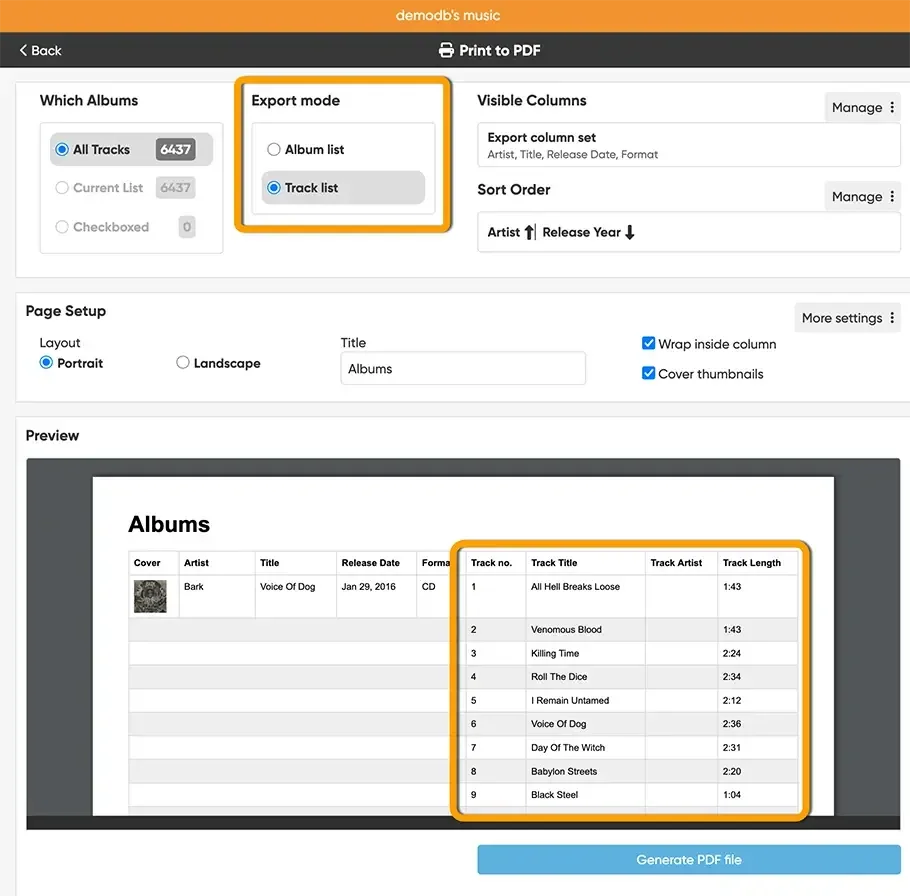
The export options also say something about the product's audience. CLZ expects you to do things with the information after entering it. If that sounds like extra work you would never choose to do, much of its depth may be surplus to your needs.
The subscription is part of the filing system
Web and Mobile are sold separately. A mobile subscription does not include the browser editor. These are CLZ's direct-shop USD prices: *10
| Product | Monthly | Annual |
|---|---|---|
| Music Mobile | $1.95 | $19.95 |
| Music Web | $3.95 | $39.95 |
| Web + Mobile bundle | Not listed | $49.90 |
The combination makes sense if you want a keyboard for editing at home and a phone catalogue in a shop. Buying both individually costs more than the annual bundle. CLZ says expired subscribers retain access to their data; that is not the same as continuing to use every service without paying.
For a substantial catalogue used every week, the annual cost can be reasonable. For a modest shelf you rarely annotate, a recurring Web subscription is harder to defend. Count the work it will actually save, rather than the number of fields it offers.
Our verdict
CLZ Music suits collectors who want to maintain a detailed inventory and are prepared to spend time doing it. Custom fields, batch editing and exports give that work a purpose. The design feels dated, but its density can suit an established filing routine, and development is still active.
The weaker fit is someone seeking a more playful relationship with their collection. There are covers to browse and listening details to keep, but the centre of gravity is administration. Choose CLZ because you want to work on your catalogue. A bigger collection helps justify it; a real need for the detail matters more.
Our overall rating
A strong inventory tool for collectors who need detailed records, batch editing and exports. Its depth earns its place when catalogue work is part of your routine.
Dense toolbars and tabbed forms feel dated. The layout keeps information close together, but offers little visual pleasure.
Custom fields, batch editing, matrix details and track-list exports give a serious catalogue plenty of room to grow.
Long-term customer accounts and responsive support support confidence in the platform. Legacy Windows custom-field migration still needs care.
Separate Web and Mobile subscriptions add up. The bundle makes sense for regular catalogue work; occasional browsing is a weaker reason to keep paying.
Sources and notes
- Web update history: custom fields, 23 February 2026; wider editor, 19 May; keyboard and list improvements, 22 June. Current official images used rather than the older Music Connect reference. Source ↩
- Web product overview, checked 10 September 2026. Screenshots in this article show Web; Mobile and legacy Windows are distinct products. Source ↩
- Web custom-field types, sorting, columns and batch editing. Source ↩
- Mobile matrix, last-cleaned and listening-history fields, version 10. Web update history records corresponding fields. Source ↩
- Developer-selected music testimonials, including Gram63, 20 March 2026 (over 2,000 albums and nearly 800 singles), and Harry Blip, 22 August 2026 (mixed formats and avoiding duplicates). These are selected testimonials, not a representative survey. Source ↩
- Marchel, five-star music review, 6 March 2026: detailed fields and helpful support. Also see the music testimonials in note 5. Company-wide Trustpilot scores include other CLZ products and are not a CLZ Music rating. Source ↩
- Jerry K, four-star “Clz second year” review, experience dated 3 August 2026: 1,100 discs catalogued, renewal-cost concern. CLZ replied offering bundle discounts. Source ↩
- 15 July 2026: customer asks about existing Windows fields; CLZ confirms one-time Web import rather than ongoing Windows custom-field synchronisation. A separate customer reported a phone sync issue resolved by reinstalling; not treated here as a current general fault. Source ↩
- Track-list CSV and PDF export added 27 August 2026. This supersedes the older forum answer that CSV excludes tracks. Source ↩
- Direct-shop USD offers and subscription policy, checked 10 September 2026. Prices are for the stated purchase channel; no currency conversion. Source ↩
- US all-version Apple rating snapshot, 10 September 2026: 4.84164 from 1,364 ratings. App Store ↩